
The Blueprint: Org Units edition is here.
In May we began rolling out the next generation of Opus, rebuilt around six modules with the Digital Twin at its centre: a living model of the automated enterprise. We also said we were just getting started. Today we’re taking the next step on that roadmap: Org Units, and with it the Blueprint Org Units edition.
Every enterprise runs on a structure. Departments, functions, and teams define who owns what, how decisions ladder up, and where responsibility sits. Yet in most companies, that structure lives in slide decks and HR systems, far from the work itself. A Digital Twin of the enterprise is only complete once it models the organisation too.
That’s what this release does. Workspaces were the first dimension of the model, describing where work is built. Org Units add the second, describing where it belongs. It’s built on two concepts working together — Org Levels and Org Units — and it ends with a view of the enterprise that hasn’t been possible before. Here’s what shipped.
A. Model your organisation
Your organisational structure, inside Opus.
What did we launch
#1 - Org Levels: Define the layers of your hierarchy once, in organisation settings. The organisation sits at the top, and below it you add the levels your company uses: departments, functions, teams, regions. Your terminology, your depth.
#2 - Org Units: The entities within those levels. Each unit is created with a name, a level, and a parent, placing it precisely in the hierarchy. View them as a list or as an org chart.
#3 - Hierarchies that reflect reality: The model doesn’t enforce a uniform pyramid. A department can report directly to the top, and one branch can run three levels deep while another runs five.
Why it’s powerful
Every enterprise already has this structure. It simply isn’t captured where the work happens. A short setup turns it into a working model: something you can assign people to, tag resources to, filter by, and visualise. And because the hierarchy bends to actual reporting lines, the model reflects the organisation as it operates, not an idealized version of it.
B. Bring in your people
An org chart that stays accurate.
What did we launch
#4 - Self-serve membership: Users join the unit they belong to, so membership always reflects where people actually sit.
#5 - Branch-scoped administration: Admins manage their own branch: its members, its roles, and the units beneath it. The top-level admin can build the full tree or delegate branches to the people who run them.
#6 - A people view of the organisation: Filter members by unit, level, or workspace, or render the full company as an org chart with names, roles, and reporting lines.
Why it’s powerful
An organisational model is only as valuable as it is current. That’s why maintenance is distributed by design: individuals join where they belong, and admins govern their own branch. The structure stays accurate because the people inside it keep it accurate.
C. Connect the work
Every process and workflow, attributed to the unit that owns it.
What did we launch
#7 - Org unit tagging: Every process and workflow is tagged to the unit responsible for it, at creation or in bulk from the listing pages.
#8 - Ownership at the unit level: Each unit’s page shows everything it’s accountable for: members, linked processes, linked workflows, and an activity trail of what changed and who changed it.
#9 - Structural filters: Narrow the full resource library to a single unit or an entire level in one click.
Why it’s powerful
Workspaces and org units answer two different questions. Workspaces describe where work is built. Org units describe where it belongs. With both dimensions in place, every resource carries clear ownership, and a question like “what does Finance run?” becomes a filter rather than an investigation.
D. See it in the Blueprint
Organisational structure and operational work in a single view.
What did we launch
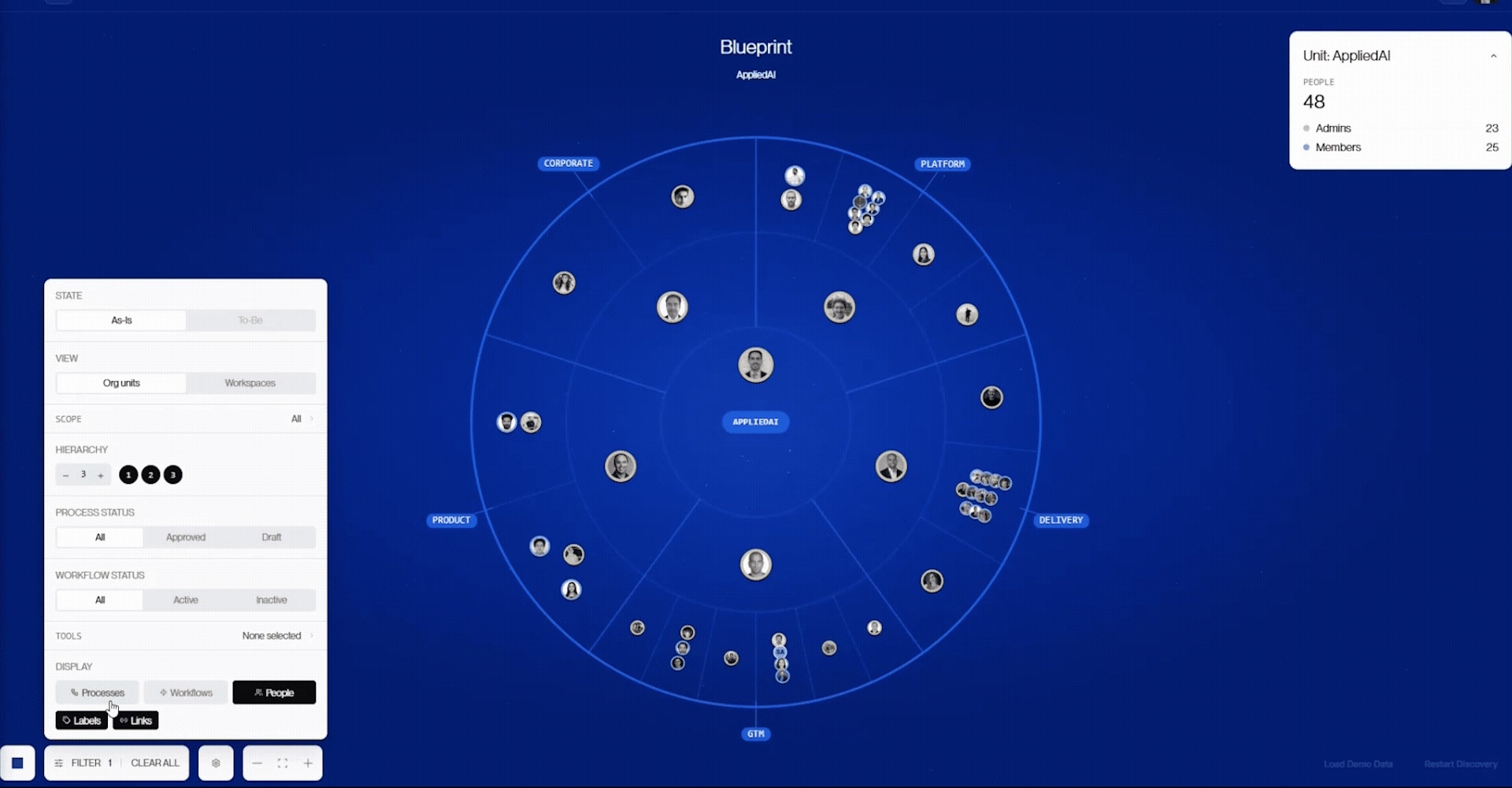
#10 - Blueprint Org Units edition: The hierarchy rendered as concentric rings, with the organisation at the centre and each branch extending outward to its actual depth.
#11 - Work in position: Every tagged process and workflow appears within the unit that owns it. The view shows not only who is on a team, but what that team runs.
#12 - Recentre and zoom: Focus on any unit to make it the centre of the view, and explore its branch to full depth.
#13 - People view: Switch the display to show the people within each unit, with admins positioned towards the centre and members further out.
Why it’s powerful
Until now, the most complete picture of an organisation was an org chart: boxes, names, and reporting lines. The Blueprint starts from that structure and adds the dimension the Digital Twin was built for — the work itself. Moving outward from the centre, processes nest within the hierarchy: some contained in a single function, some rolling up to a department, some spanning the entire organisation. The structure of the organisation and the structure of its work become one picture.
If you’re already on Opus
Nothing changes about your workspaces. Org units run alongside them as a second dimension, not a replacement. Your top-level unit already exists under your organisation’s name, with admin rights held by the organisation’s creator, ready to build the tree or delegate its branches. You’ll also notice the sidebar now shows pinned units and pinned workspaces rather than the full workspace list, keeping navigation clean as your structure grows.
The model grows with you.
In May, the Digital Twin gave you a living model of your processes, workflows, and cases. Today it learns your organisation: your structure, your people, and your work in a single picture of how the enterprise operates.
It’s live for all Opus organisations. And as before, we’re just getting started. Onwards!